Related Posts Plugin for WordPress, Blogger...

iTechSpeak :::...

"THE HUMAN SIDE OF TECHNOLOGY" for convenience, productivity, safety, profitability or fun. This is the place to be to keep your finger on the pulse in emerging technologies. When should you zig when everyone else zags? Where should you concentrate your time, money or effort to capitalize on the next technology tsunami? Stay tuned . . . -Published by SAVVY INTRAPRENEUR
Showing posts with label spoof. Show all posts

Reminder: Beware Of Phishing Emails

Posted by Carl E. Reid, CSI Tuesday, November 15, 2016 0 comments

Clicking on ANY links in these types of emails can potentially cause irreparable damage to your computer or information stored on your computer network.

Did I mention the part about possible identity theft can be accomplished from these types of emails too?

Please familiarize yourself with the tonality, typos and poor grammar of the 3 sample phishing emails that provide clues below.

This is a reminder to be Suspicious of emails telling you to . . . 

  • Appear in court
  • Update your account
  • You owe a debt and click on the attachment for details
  • Update your American Express / Credit card account

If you received a similar phishing (fishing) emails, please DELETE it immediately.  
Please call American Express directly to confirm "real" account issues.

Sample #1 of Recent phishing email NOT from American Express
From: "American Express" <Americanexpress@securityserver.com>
To: YOU@YourEmailAddress.com
Sent: Saturday, August 23, 2014 8:15:52 AM
Subject: Unauthorized activity on your online account

Dear Customer:

Your account requires a complete profile update,

We have recently detected that a different computer user has attempted gaining access to your online account, and multiple wrong passwords were attempted with your user ID.

It is now necessary to re-confirm your account information to us. If this process is not completed within 24-48 hours,

we will be forced to suspend your account online access as it may have been used for fraudulent purposes.

Please update your profile immediately by downloading the attached file.

American Express is dedicated to protecting your information.

_____________________________________

Phishing Sample #2 to appear in Court
From: "Court Agent" <reference047@washingtontruckaccidentlawyers.com>
To: YOU@YourEmailAddress.com
Sent: Friday, August 22, 2014 4:44:15 PM
Subject: Illegal software use

As a defendant you have been scheduled to attend the hearing in the Court of Port St. Lucie.

Hearing date: 21 September 2014
Hearing time: 11:00 a.m.
Hearing subject: illegal use of software

Prior to the court thoroughly study the plaint note in the attachment to this mail.

Sincerely,
Court agent,
Alison Smith
_________________________________

Sample #3 from BOGUS Helpdesk
From: "HELP DESK" <markwel@zoominternet.net>
Sent: Tuesday, July 29, 2014 8:56:02 AM
Subject: IT

Dear Email Account Users,

We are upgrading Email over the next several weeks We urge all urge to participate in this upgrade. With the new upgrade, you'll see new features and enhancements included

Submit your details for confirmation of account. HERE

Thanks for your Co-operation.
IT SERVICE DESK

Thank you for being a valued customer.

Kind Regards,

SafeGuards Team.

(C) 2016 American Express Company. All rights reserved.

All users of our online services subject to Privacy Statement and agree to be bound by Terms of Service. Please review.

DO NOT CLICK ON ANY OF THE LINKS
IN THIS ARTICLE.
THIS VERY REAL
"PHISHING EMAIL"
IS PRESENTED
STRICTLY FOR
EDUCATIONAL PURPOSES ONLY.


Using a little common sense will go a long way in preventing identity theft. Any time you receive an email asking for sensitive information, contact your financial institution directly. NO Financial institution initiates communications with customers to request personal, account or login information via email, by phone or by letter. Let me say that again. NO Financial institution initiates communications with customers to request personal, account or login information via email, by phone or by letter. If your bank does, change banks IMMEDIATELY.

I know from personal experience Paypal is a stand up organization that takes every precaution, and then some, to protect all customers' personal information and accounts. Go directly to the Paypal web site and click on the "Security Center" link, in the top right corner, for more information on preventing identity theft. Don't even dream about saying "I don't have time to read" this valuable information. Would you rather spend endless hours, days, months or even years trying correct the damage done by someone who steals your identity?

Highlighted in red below are indications of red flags to be on the look out for, in order to quickly identify a bogus email that appears as though it's from your financial institution. Although this email is specific to Paypal, scammers use similiar approaches in the wording of a fake email, to make you think it is from your financial institution. Different variations of the domain email.paypal.com and email1.paypal.com are used in the fake "phishing" email below.

-------------FAKE PHISHING EMAIL ------------
To ensure that your PayPal emails get to your inbox,
please add paypal@email.paypal.com
to your email Address Book or Safe List


Safety
Tips

Ensure a fraud-free purchase


Don't fall for a
fake email

Your Security

Privacy: how to keep your identity private


Protection: how to keep your purchase safe


Prevention: how PayPal shields you from fraud


Activate your PayPal account

Dear FirstName LastName,

We've noticed that you haven't yet confirmed your email address. Just follow the steps below and you can start using PayPal to shop securely online at hundreds of stores, sell on eBay or even send money by texting on your mobile phone.

Confirming your email address

  1. Log in to your account at
    www.paypal.com


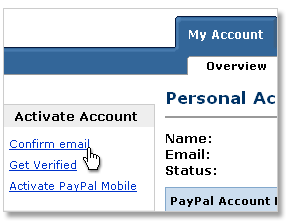
  2. Click the "Confirm email" subtab in the "Activate Account" section:
    Account overview screengrab

    Now follow the on-screen instructions.
    We will send an email to the
    addressregistered to your
    PayPal account


  3. Check your email inbox for an email
    from PayPal, click on the link and
    enter your password


Your email address will now be confirmed and your account activated. See what you can do with PayPal.

Thank you for using PayPal!
PayPal


Helpful Links: Forgotten Password | Help | Your Security | Contact Us
How do I know this is not a Spoof email?
Spoof or 'phishing' emails tend to have generic
greetings such as "Dear PayPal member".
Emails from PayPal will always address
you by your first and last name
.
Find out more here.


This email was sent to YourEmailAddress@domain.net, because your email preferences are set to receive the PayPal Periodical newsletter and Product Updates. Unsubscribe.

© 2008 PayPal Inc. All rights reserved. PayPal is located at 2211 N. First St., San Jose, CA 95131.