Related Posts Plugin for WordPress, Blogger...

iTechSpeak :::...

"THE HUMAN SIDE OF TECHNOLOGY" for convenience, productivity, safety, profitability or fun. This is the place to be to keep your finger on the pulse in emerging technologies. When should you zig when everyone else zags? Where should you concentrate your time, money or effort to capitalize on the next technology tsunami? Stay tuned . . . -Published by SAVVY INTRAPRENEUR
Showing posts with label safety. Show all posts

DIY Identity Theft Protection Credit Freeze

Posted by Carl E. Reid, CSI Thursday, May 25, 2017 0 comments

photo courtesy of Canva.com
by Carl E Reid,
Evernote certified consultant


This is a do it yourself (DIY) project, with 3 instructional videos. Submitting a credit freeze protects you from thieves attempting to steal your identity by creating NEW credit accounts in your name. I have tested this several times by applying for credit cards, applying for a loan and opening new bank accounts. Each time the new credit requests were submitted I consistently received those rejection letters via snail mail.

Once the credit report is frozen any legitimate requests for credit cards, loans, job background credit checks, landlord rental credit checks or mortgages will be rejected. You will submit a separate request to temporarily or permanently lift the credit freeze, if you wish open credit accounts. The reporting agency will notify you of all legitimate and fraudulent requests to access your credit report.

If you want to lock your credit reports, below are the online applications for credit reporting agencies.

Click here to Submit request for EQUIFAX Security Freeze

Click here to submit request for EXPERIAN Security Freeze

Click here to submit a TransUnion Security Freeze


Below are 3 informational videos.


Reminder: Beware Of Phishing Emails

Posted by Carl E. Reid, CSI Tuesday, November 15, 2016 0 comments

Clicking on ANY links in these types of emails can potentially cause irreparable damage to your computer or information stored on your computer network.

Did I mention the part about possible identity theft can be accomplished from these types of emails too?

Please familiarize yourself with the tonality, typos and poor grammar of the 3 sample phishing emails that provide clues below.

This is a reminder to be Suspicious of emails telling you to . . . 

  • Appear in court
  • Update your account
  • You owe a debt and click on the attachment for details
  • Update your American Express / Credit card account

If you received a similar phishing (fishing) emails, please DELETE it immediately.  
Please call American Express directly to confirm "real" account issues.

Sample #1 of Recent phishing email NOT from American Express
From: "American Express" <Americanexpress@securityserver.com>
To: YOU@YourEmailAddress.com
Sent: Saturday, August 23, 2014 8:15:52 AM
Subject: Unauthorized activity on your online account

Dear Customer:

Your account requires a complete profile update,

We have recently detected that a different computer user has attempted gaining access to your online account, and multiple wrong passwords were attempted with your user ID.

It is now necessary to re-confirm your account information to us. If this process is not completed within 24-48 hours,

we will be forced to suspend your account online access as it may have been used for fraudulent purposes.

Please update your profile immediately by downloading the attached file.

American Express is dedicated to protecting your information.

_____________________________________

Phishing Sample #2 to appear in Court
From: "Court Agent" <reference047@washingtontruckaccidentlawyers.com>
To: YOU@YourEmailAddress.com
Sent: Friday, August 22, 2014 4:44:15 PM
Subject: Illegal software use

As a defendant you have been scheduled to attend the hearing in the Court of Port St. Lucie.

Hearing date: 21 September 2014
Hearing time: 11:00 a.m.
Hearing subject: illegal use of software

Prior to the court thoroughly study the plaint note in the attachment to this mail.

Sincerely,
Court agent,
Alison Smith
_________________________________

Sample #3 from BOGUS Helpdesk
From: "HELP DESK" <markwel@zoominternet.net>
Sent: Tuesday, July 29, 2014 8:56:02 AM
Subject: IT

Dear Email Account Users,

We are upgrading Email over the next several weeks We urge all urge to participate in this upgrade. With the new upgrade, you'll see new features and enhancements included

Submit your details for confirmation of account. HERE

Thanks for your Co-operation.
IT SERVICE DESK

Thank you for being a valued customer.

Kind Regards,

SafeGuards Team.

(C) 2016 American Express Company. All rights reserved.

All users of our online services subject to Privacy Statement and agree to be bound by Terms of Service. Please review.

Passphrase Smarter Than Password

Posted by Carl E. Reid, CSI Tuesday, November 8, 2016 0 comments

With the Twitter, LinkedIn, Facebook passwords leaks, I thought this might be a good tutorial to share with staff, to make your technology customer support team's job easier. Modify as you feel appropriate. 

How To Smartly Create Passwords 

  • Don't re-use passwords. One ultra-secure one won't be any good if someone finds it.
  • While combining upper and lower case passwords with numbers to alter a memorable word - M4rsin$pace - is often advised, these are more easily cracked than you might think
  • The best strategy advice is to create a memorable, PASSPHRASE sentence [don't use these samples]:  I$wimatTHEbeach2016 | "I am a $erious Winner in 2017" is better than "My name is John", and use the first letter of each word with punctuation: "Iaa$Wi2017"
  • Consider using a password manager such as 1Password, which generates and stores your secure passwords.
_____________________________________
About the Author - 
click here to contact Carl

With corporate travels from the mail room to the board roomCarl E. Reid knows what it takes to be successful in the business arena. He has over 46 years of business experience, including 34 years as an information technology expert, 20 years as a business startup / career coach and 23 years as a successful entrepreneur. In addition to being founder of Savvy Intrapreneur, Carl has been a professional blogger and social media expert since 2004. In addition to being a sought after speaker, he publishes Library of Congress recognized blog www.SavvyIntrapreneur.com.  Carl has been published in "Network World" and "Computer Monthly" magazines, resulting in being a technology expert witness in court. 
Email: IGetSmart@SavvyIntrapreneur.comWeb: www.CarlEReid.com
Tel: 201-222-5390Twitter: @CarlEReid @Intrapreneur @iTechSpeak
Click here to view Carl's Amazon Author page

10 Emergency Survival Kit Technology Tips

Posted by Unknown Sunday, May 4, 2014 0 comments

Society lives in a different world than we did 20, 30, 40 or 50 years ago.  A childhood car ride to the airport included my father being able to take us right up to the boarding area just to watch planes land and take off.  Today, only ticketed, ID verified, bare foot, metal detector frisked passengers are allowed to go to the airport boarding area. Airport lines are longer, no more back packs at running / marathon races, metal detectors at high school dances and the hits just keep on coming.

Aligned with our global societal issues, there is a strange phenomena that mother nature and her environmental children (weather, earth and water) appear to be willingly complicating our lives even more. Planning for natural disasters dictates having available technology so our business and personal lives can function with some semblance of normal.
 
Being a blessed Hurricane Sandy survivor, it was a week of deep introspection and being thankful for some technology gadgets my wife and I had in place.  Beyond the batteries, snacks, a first aid kit, a generator, flashlights and tunes your children listen to until their cell phone die, I share some food for thought to consider on essential technology considerations and gadgets to have in your home survival kit . . . just in case.

1. Know whether 911 support is provided by your telephone [TRUE] land line provider, Internet phone provider and cell phone provider. Wow!! I just used the word "providers" 3 times for vendors who may or may not provide.  Contact each provider TODAY [aka, before your need] to find out how or if they provide 911 service. 

2. Have a battery powered AM/FM radio available.  This allows you to stay informed and make INTELLIGENT DECISIONS on next steps to protect your family. (i.e. should we stay or move quickly?)

3. Back up and charged batteries for your phone, mobile devices, computer notebook.

4. Have car cigarette lighter dual USB cables to charge 2 gadgets,. This especially works well if you have an iPhone and your spouse has an Android phone or vice versa. Plan ahead for acquiring appropriate charging adapters.

5. Back up your household Internet connection with an alternate 4G service, like Clear, Freedom Pop or Netzero.  They provide rechargeable routers, you will at least be able to connect your iPad or or notebook computer online to read and access necessary web sites. Downloading or uploading photos will not work well through these services, due to data speed restrictions. Having no electricity for 1 week during Hurricane Sandy, my wife I were really happy using our Clear device to run our business interests and communicate with clients. Clear is month to month service. So you can turn it ON and OFF, when it suits you.

6. A Solar charger for recharging all your mobile devices is a smart move. Using sunlight or overcast daylight is usually enough to keep your solar charger juiced.  Get 2 solar chargers, so you can work on your computer, your phone can be charging and your children have their own mobile device being recharged.

7. Consider acquiring an emergency / weather scanner. This will provide additional information local to your area, which may not be provided by news reports on your AM/FM radio.  Before you acquire a scanner, please read the scanner usage laws in your state.  It is my understanding police scanner apps downloaded to mobile devices are illegal, once you take the device out of your house.

8. This may seem obvious, but download a battery manager onto your phone or mobile device.  This works well will with conserving power, your next available charge is unknown with the electricity power out. 

9.   Update your ICE contacts on your cell phone address book and print them out on paper.

10. Set quarterly "To Do" reminders on your cell phone to check emergency gadgets being fully charged and have a family fire drill. Or you can use FollowUpThen.com to schedule email reminders for everyone in the family to check their back up rechargers.  Although unused, over time the available power in your emergency back up charged gadgets will dissipate.  Just like a fire extinguisher being periodically inspected, battery reliant electronic devices need to be checked on a scheduled basis, before you really need them.

BONUS 11. Back up your spreadsheets, word processor documents and any other essential data files you need to a key chain thumb drive.  If your computer goes south permanently, al least business presentations and personal life can be referenced or modified on another computer at the library, a neighbor's house or a local hotel.  You can never have too many back ups. Give your spouse a thumb drive key chain copy of files, as well.

Silver Alert vs. Amber Alert

Posted by Unknown Friday, February 15, 2013 0 comments

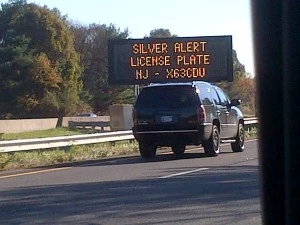
So I'm driving south on the New Jersey Turnpike for a meeting in Trenton.  I passed several digital highway signs flashing a Silver Alert with a license plate number.  For the life of me, I could not figure out what this Silver Alert was about.

After doing a little research [not while driving], I found out “Silver Alert” or “Senior Alert” programs help identify and locate missing seniors with cognitive impairments (i.e. Alzheimer's Disease, dementia etc.). Modeled after the United States federal Amber Alert system for abducted children, Silver Alert programs create an emergency notification system in which law enforcement agencies broadcast using radio, television and electronic highway signs. Read details on how Silver Alert legislation started.