Related Posts Plugin for WordPress, Blogger...

iTechSpeak :::...

"THE HUMAN SIDE OF TECHNOLOGY" for convenience, productivity, safety, profitability or fun. This is the place to be to keep your finger on the pulse in emerging technologies. When should you zig when everyone else zags? Where should you concentrate your time, money or effort to capitalize on the next technology tsunami? Stay tuned . . . -Published by SAVVY INTRAPRENEUR

DIY Identity Theft Protection Credit Freeze

Posted by Carl E. Reid, CSI Thursday, May 25, 2017 0 comments

photo courtesy of Canva.com
by Carl E Reid,
Evernote certified consultant


This is a do it yourself (DIY) project, with 3 instructional videos. Submitting a credit freeze protects you from thieves attempting to steal your identity by creating NEW credit accounts in your name. I have tested this several times by applying for credit cards, applying for a loan and opening new bank accounts. Each time the new credit requests were submitted I consistently received those rejection letters via snail mail.

Once the credit report is frozen any legitimate requests for credit cards, loans, job background credit checks, landlord rental credit checks or mortgages will be rejected. You will submit a separate request to temporarily or permanently lift the credit freeze, if you wish open credit accounts. The reporting agency will notify you of all legitimate and fraudulent requests to access your credit report.

If you want to lock your credit reports, below are the online applications for credit reporting agencies.

Click here to Submit request for EQUIFAX Security Freeze

Click here to submit request for EXPERIAN Security Freeze

Click here to submit a TransUnion Security Freeze


Below are 3 informational videos.


Reminder: Beware Of Phishing Emails

Posted by Carl E. Reid, CSI Tuesday, November 15, 2016 0 comments

Clicking on ANY links in these types of emails can potentially cause irreparable damage to your computer or information stored on your computer network.

Did I mention the part about possible identity theft can be accomplished from these types of emails too?

Please familiarize yourself with the tonality, typos and poor grammar of the 3 sample phishing emails that provide clues below.

This is a reminder to be Suspicious of emails telling you to . . . 

  • Appear in court
  • Update your account
  • You owe a debt and click on the attachment for details
  • Update your American Express / Credit card account

If you received a similar phishing (fishing) emails, please DELETE it immediately.  
Please call American Express directly to confirm "real" account issues.

Sample #1 of Recent phishing email NOT from American Express
From: "American Express" <Americanexpress@securityserver.com>
To: YOU@YourEmailAddress.com
Sent: Saturday, August 23, 2014 8:15:52 AM
Subject: Unauthorized activity on your online account

Dear Customer:

Your account requires a complete profile update,

We have recently detected that a different computer user has attempted gaining access to your online account, and multiple wrong passwords were attempted with your user ID.

It is now necessary to re-confirm your account information to us. If this process is not completed within 24-48 hours,

we will be forced to suspend your account online access as it may have been used for fraudulent purposes.

Please update your profile immediately by downloading the attached file.

American Express is dedicated to protecting your information.

_____________________________________

Phishing Sample #2 to appear in Court
From: "Court Agent" <reference047@washingtontruckaccidentlawyers.com>
To: YOU@YourEmailAddress.com
Sent: Friday, August 22, 2014 4:44:15 PM
Subject: Illegal software use

As a defendant you have been scheduled to attend the hearing in the Court of Port St. Lucie.

Hearing date: 21 September 2014
Hearing time: 11:00 a.m.
Hearing subject: illegal use of software

Prior to the court thoroughly study the plaint note in the attachment to this mail.

Sincerely,
Court agent,
Alison Smith
_________________________________

Sample #3 from BOGUS Helpdesk
From: "HELP DESK" <markwel@zoominternet.net>
Sent: Tuesday, July 29, 2014 8:56:02 AM
Subject: IT

Dear Email Account Users,

We are upgrading Email over the next several weeks We urge all urge to participate in this upgrade. With the new upgrade, you'll see new features and enhancements included

Submit your details for confirmation of account. HERE

Thanks for your Co-operation.
IT SERVICE DESK

Thank you for being a valued customer.

Kind Regards,

SafeGuards Team.

(C) 2016 American Express Company. All rights reserved.

All users of our online services subject to Privacy Statement and agree to be bound by Terms of Service. Please review.

Passphrase Smarter Than Password

Posted by Carl E. Reid, CSI Tuesday, November 8, 2016 0 comments

With the Twitter, LinkedIn, Facebook passwords leaks, I thought this might be a good tutorial to share with staff, to make your technology customer support team's job easier. Modify as you feel appropriate. 

How To Smartly Create Passwords 

  • Don't re-use passwords. One ultra-secure one won't be any good if someone finds it.
  • While combining upper and lower case passwords with numbers to alter a memorable word - M4rsin$pace - is often advised, these are more easily cracked than you might think
  • The best strategy advice is to create a memorable, PASSPHRASE sentence [don't use these samples]:  I$wimatTHEbeach2016 | "I am a $erious Winner in 2017" is better than "My name is John", and use the first letter of each word with punctuation: "Iaa$Wi2017"
  • Consider using a password manager such as 1Password, which generates and stores your secure passwords.
_____________________________________
About the Author - 
click here to contact Carl

With corporate travels from the mail room to the board room, Carl E. Reid knows what it takes to be successful in the business arena. He has over 46 years of business experience, including 34 years as an information technology expert, 20 years as a business startup / career coach and 23 years as a successful entrepreneur. In addition to being founder of Savvy Intrapreneur, Carl has been a professional blogger and social media expert since 2004. In addition to being a sought after speaker, he publishes Library of Congress recognized blog www.SavvyIntrapreneur.com.  Carl has been published in "Network World" and "Computer Monthly" magazines, resulting in being a technology expert witness in court. 
Email: IGetSmart@SavvyIntrapreneur.comWeb: www.CarlEReid.com
Tel: 201-222-5390Twitter: @CarlEReid @Intrapreneur @iTechSpeak
Click here to view Carl's Amazon Author page

10 Emergency Survival Kit Technology Tips

Posted by Unknown Sunday, May 4, 2014 0 comments

Society lives in a different world than we did 20, 30, 40 or 50 years ago.  A childhood car ride to the airport included my father being able to take us right up to the boarding area just to watch planes land and take off.  Today, only ticketed, ID verified, bare foot, metal detector frisked passengers are allowed to go to the airport boarding area. Airport lines are longer, no more back packs at running / marathon races, metal detectors at high school dances and the hits just keep on coming.

Aligned with our global societal issues, there is a strange phenomena that mother nature and her environmental children (weather, earth and water) appear to be willingly complicating our lives even more. Planning for natural disasters dictates having available technology so our business and personal lives can function with some semblance of normal.
 
Being a blessed Hurricane Sandy survivor, it was a week of deep introspection and being thankful for some technology gadgets my wife and I had in place.  Beyond the batteries, snacks, a first aid kit, a generator, flashlights and tunes your children listen to until their cell phone die, I share some food for thought to consider on essential technology considerations and gadgets to have in your home survival kit . . . just in case.

1. Know whether 911 support is provided by your telephone [TRUE] land line provider, Internet phone provider and cell phone provider. Wow!! I just used the word "providers" 3 times for vendors who may or may not provide.  Contact each provider TODAY [aka, before your need] to find out how or if they provide 911 service. 

2. Have a battery powered AM/FM radio available.  This allows you to stay informed and make INTELLIGENT DECISIONS on next steps to protect your family. (i.e. should we stay or move quickly?)

3. Back up and charged batteries for your phone, mobile devices, computer notebook.

4. Have car cigarette lighter dual USB cables to charge 2 gadgets,. This especially works well if you have an iPhone and your spouse has an Android phone or vice versa. Plan ahead for acquiring appropriate charging adapters.

5. Back up your household Internet connection with an alternate 4G service, like Clear, Freedom Pop or Netzero.  They provide rechargeable routers, you will at least be able to connect your iPad or or notebook computer online to read and access necessary web sites. Downloading or uploading photos will not work well through these services, due to data speed restrictions. Having no electricity for 1 week during Hurricane Sandy, my wife I were really happy using our Clear device to run our business interests and communicate with clients. Clear is month to month service. So you can turn it ON and OFF, when it suits you.

6. A Solar charger for recharging all your mobile devices is a smart move. Using sunlight or overcast daylight is usually enough to keep your solar charger juiced.  Get 2 solar chargers, so you can work on your computer, your phone can be charging and your children have their own mobile device being recharged.

7. Consider acquiring an emergency / weather scanner. This will provide additional information local to your area, which may not be provided by news reports on your AM/FM radio.  Before you acquire a scanner, please read the scanner usage laws in your state.  It is my understanding police scanner apps downloaded to mobile devices are illegal, once you take the device out of your house.

8. This may seem obvious, but download a battery manager onto your phone or mobile device.  This works well will with conserving power, your next available charge is unknown with the electricity power out. 

9.   Update your ICE contacts on your cell phone address book and print them out on paper.

10. Set quarterly "To Do" reminders on your cell phone to check emergency gadgets being fully charged and have a family fire drill. Or you can use FollowUpThen.com to schedule email reminders for everyone in the family to check their back up rechargers.  Although unused, over time the available power in your emergency back up charged gadgets will dissipate.  Just like a fire extinguisher being periodically inspected, battery reliant electronic devices need to be checked on a scheduled basis, before you really need them.

BONUS 11. Back up your spreadsheets, word processor documents and any other essential data files you need to a key chain thumb drive.  If your computer goes south permanently, al least business presentations and personal life can be referenced or modified on another computer at the library, a neighbor's house or a local hotel.  You can never have too many back ups. Give your spouse a thumb drive key chain copy of files, as well.

Happiness is Firing Your Cable Company

Posted by Unknown Sunday, November 17, 2013 0 comments


I just mailed my HD box back to the cable company and canceled my service, while still being able to view TV shows and movies at a tiny fraction of the cost. My personal board of directors (my family) is happy about the new income windfall due to the yearly savings.

Unless cable TV providers upgrade their business model, they may disappear with black and white television.

4 years back I bought a Sony Play Station 3 (PS3) to entertain my grand children when they visit. I never once played a video game on my PS3 or had any personal use for it. This may be due to overdosing on playing video games, when my brother and I ran a business distributing the original floor model video games in the 1980s. We had them in pizza parlors, Coney Island and other locations.  My job was business development and fixing the video games.  So I played a lot of free games after each repair.

Rewind to 3 weeks ago.  Out of sheer curiosity I decided to see what would happen, if I connected my PS3 between my Sony Bravia HDTV and the Internet.  After a 45 minute software upgrade to the PS3 operating system, I experienced an epiphany.  Without spending a dime I watched The History Channel, National Geographic, Mad Men, In Plain Sight and Burn Notice. These are the same shows I used to watch through my cable TV provider.

To help my Chief financial Officer (my wife) transition easier into this crazy idea of terminating the cable company, I purchased a $25 "TV like" remote control programmed to work specifically with the PS3.  She was not about to use the P
S3 game control joy sticks to watch TV.  Voila, she is now a happy camper being able to watch American Pickers, Pawn Stars, Drop Dead Diva and other shows she likes.

I now get caught on the news by going to
ChannelChooser.com, using the PS3 web browser.

Oh, did I mention being able to get on Facebook, Twitter and LinkedIn is easy on the eyes when being viewed on a 48" HDTV, from my reclining chair.

Total Startup Cost (minus PS3 cost since it was bought years ago)
$25.00
one time cost for PS3 TV remote control
1st month FREE for Netflix

Total monthly cost (starting next month): 8$ per month for Netflix. Estimate just under $10 with the taxes.

I'm not suggesting you drop $200 to 300 down to buy a PS3. A $100 Roku box will work just as well or better.  Cost includes a remote control.

Reach out to me, if you need a little technical advice before firing your cable company.


About the Author
---------------------

Carl E. Reid is a technology expert, social media strategist and business career coach at Savvy Intrapreneur. CReid3005[AT]gmail.com - Tel: 201-222-5390

Business Intelligence on How To Brand with Twitter

Posted by Unknown Tuesday, March 12, 2013 0 comments

Did you know Twitter engagement rates are higher on Saturday and Sunday? Below is an excellent infographic provided by Linchpin SEO, which provides the clues needed to crack the mystery of how to really engage people on Twitter.  

As I mention to my clients, having a social media presence is not enough. Converting social media presence into "influence" is the challenge. Social media Influence is what really translates into sales leads or referrals for sales conversions.

People do business with people they know, like and trust.  The hard question is how do we get Social media to emulate this basic human interaction. Engaging conversations with people, which makes those people share your value with others.

The question I suggest my clients ask themselves [as they look at each social media platform] is "Are we selling something or sharing something of value?" Sharing value is what people tune in to and VALUE is what people share.


The Linchpin SEO does an excellent job of teaching how, when and why engaging people builds personal and business brands.


Twitter Cheat Sheet
Twitter Cheat Sheet , an infographic by Linchpin Infographic Design

Back in 2007 our article Replace Incandescent Bulb with Fluorescent Bulb talked about how the U.S. Clean Energy Act of 2007 makes the incandescent light bulb go away, saves quite a bit of money on electric bills and creates awesome opportunities as the same time.  We failed to mention the bizarre things people might do to continue using those energy hogging incandescent light bulbs.

From a Business Week article, on January 1, 2013 traditional incandescent 75 watt bulbs were phased out. The phasing out of traditional 100 watt incandescent light bulbs in January 2012 ignited panic, making consumers take some wacky actions. 

Home Depot reported a 20 percent spike in sales of 100 watt bulbs for 2011, as people rushed to stockpile for the future. At least one Ohio woman made sure to squirrel away enough bulbs to last 50 years. This time around, however, shoppers seem more relaxed. Bill Hamilton, president of light bulb merchandising at Home Depot, says, “Customers are beginning to embrace the new technology.”

Silver Alert vs. Amber Alert

Posted by Unknown Friday, February 15, 2013 0 comments

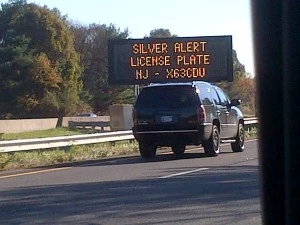
So I'm driving south on the New Jersey Turnpike for a meeting in Trenton.  I passed several digital highway signs flashing a Silver Alert with a license plate number.  For the life of me, I could not figure out what this Silver Alert was about.

After doing a little research [not while driving], I found out “Silver Alert” or “Senior Alert” programs help identify and locate missing seniors with cognitive impairments (i.e. Alzheimer's Disease, dementia etc.). Modeled after the United States federal Amber Alert system for abducted children, Silver Alert programs create an emergency notification system in which law enforcement agencies broadcast using radio, television and electronic highway signs. Read details on how Silver Alert legislation started.

Why the iPad2 is a Game-Changer

Posted by Ronald G. Richards Tuesday, October 4, 2011 0 comments


A game-changer is a term used to describe something that has the potential to alter the outcome when brought into an activity. In business, for something to be a game-changer, it has to produce an advantage. I will show why I think Apple’s iPad2 is a game-changer that can produce such an advantage.

Much has been written on the technological prowess of the iPad2. Articles have appeared on its specific use such as point-of-sale in retail, or as a replacement for medical clipboards in hospitals where notes can be recorded and shared; as well as checked against a patient’s entire medical record. While these uses reflect increased productivity and efficiency, they are “tactical” uses. I would like to present a hypothetical example of how the iPad2 can be used strategically, thus making it a game changer.

The scenario: You and a partner are real estate investors. You’ve done your research and found a good property. From your due diligence you find out there is distress to the property, which the current owner has let run down, and on the owner himself where other obligations are forcing him to sell.

The situation: The deal will only work if you get your offer accepted; however the owner is stubborn. Time is of the essence as your investors expect you to put the deal together now, but you can’t go any higher on your offer.

The dilemma: How do you convince the owner he is better off accepting your offer?

The solution: You meet with the owner and bring your iPad2. You show him a picture taken in a room at the top of the building. It shows a wall with dark stains in the upper corner where the wall meets the ceiling. You play a video you made showing your partner tapping on the wall, an action that produces a knocking sound until he reaches the area of the stain where a squishing sound is produced. It is undeniably soggy from water damage and likely indicates major roof repair is needed; something that was heretofore undetected. You start a video conference with your partner who just happens to be on the scene at the property with his own iPad2. You bring up documents, slides, and analysis with estimates supporting your conclusions. You ask the owner if he has any questions. You express sorrow, and though still interested in the property, will have to adjust your offer down to account for necessary repairs to the newly uncovered problems.

Advantage: iPad2.

The outcome: The offer is accepted.

You can see how this dynamic can move business activity in new ways. The iPad2 inspires creativity and imagination. It’s why I find the iPad2 such an exciting and transformative product.


An accomplished Program/Project Manager with extensive experience in consulting and business development in both public and private sectors. A professional bringing direction, motivation and experience to the table with an entrepreneurial approach to business development.  Accomplishment through organization and process; Business Continuity, Disaster Recovery, and Continuity of Operations are his forte. A strong advocate of Enterprise Resilience and Crisis Management currently engaged in establishing the practice of Supply Chain Resiliency for JVKellyGroup, Inc., an eminent Risk Management consulting firm.

Simple Facebook Tip to Extend Personal Brand Reach

Posted by Unknown Saturday, May 14, 2011 0 comments

Most email software (i.e. outlook, gmail etc.) has a type-ahead feature. This is also referred to as auto-complete. This function remembers and stores addresses you send to. When you start typing names of a previously stored contacts, your email software will recognize it and offer suggestions for completing the name text for you.

Facebook has a similar type ahead feature, when posting "comments", on a "wall" or in a group.  As you will see in the picture above, using the "@" symbol and typing the first letter of a name triggers Facebook to present a drop down menu.  You can now select friends, business pages you "Like" and calendar events you published on Facebook.  Whatever selection you make from the menu  (i.e. a friend's name) will be converted to a hyper link people can click on and visit that page.  To complete the hyper link conversion, you must press to save a comment or click the "Share" button on a wall post.

By using the "@" symbol with a friend's name you extend your visibility. Your friend is notified on their Facebook news feed that you mentioned them. Your friend's friends also see your comment. 

This is a great way to edify friends, while getting your smiling face in front of new people.  You might even make some new friends.

Carl E. Reid
Social Media Strategist, Intrapreneur Coach, Author, Speaker
  Tel: 201-222-5390  *  Carl E. Reid.com
"Success Synergy through Intrapreneur Savvy, Human Capital and Tech Strategy"
Give Yourself  A Raise Anytime You Want?  "LIKE" Savvy Intrapreneur on Facebook
Be On All Your Social Media Sites with 1 Button Autopilot Publishing  Social Media Solutions by Savvy Intrapreneur

Facebook Branding Window Opens at 25 Closes at 100

Posted by Unknown Friday, March 25, 2011 2 comments

If you just made that awfully smart move to create a Facebook business page, your opportunity to create a branded link is right around the corner. This allows for shortening that very long link Facebook assigned when you created your business page to http://Facebook.com/YourBrandName

Once 25 people "Like" your business page, Facebook opens the window so you can create a branded link.

Watch out!! Monitor your business page "Likes". Facebook closes the opportunity to create a much shorter branded link, once your page has 100 "Likes". Now you will be stuck with that ridiculously long link, which will take up every inch of space on your business card.


About the Author
---------------------

Carl E. Reid is a technology expert, social media strategist and business career coach at Savvy Intrapreneur. CReid3005[AT]gmail.com - Tel: 201-222-5390

Can Facebook be Used to Develop Meaningful Relationships

Posted by Unknown Tuesday, March 8, 2011 0 comments

Can Facebook be used as a job search, business development or networking tool for creating meaningful business relationships? 

What do you think? Reply here and pick up some free job search tools while you're at it.

Social Media Team Effort for Getting the Word Out

Posted by Unknown Friday, March 4, 2011 0 comments

Some suggested steps to create buzz for acquiring new clients.  Similar to everyone in an organization having business cards, this tandem effort by all team members will produce a synergy in results.

1. Make sure the company blog is RSS enabled. That means the little orange chicklet should be visible on the blog. This allows people to channel in/out using their RSS readers. RSS stands for Really Simple Syndication. 
Having a blog with no RSS feed is like having a telephone with no dial tone. You can't communicate with the rest of the world. - Click here for RSS article details

Ask your web developer to flip the switch "On" for displaying the RSS chicklet on the blog.  Once this is completed, it sets the stage for "1 button publishing".  Publish a blog article. The article will automatically distribute to Twitter, Facbook and LinkedIn accounts for ALL
team members.

2. In preparation for
"1 button publishing", everyone on the team should have accounts on Twitter, Facebook and LinkedIn.  You can hook your Twitter account into your Facebook and LinkedIn accounts.

3. Consider setting up a business page on Facebook.  Here's an article for details: New Facebook Changes Provides Best of Both Worlds -

Press Enter Once: Publish to All Social Media Platforms

Posted by Unknown Wednesday, March 2, 2011 0 comments

Branding and marketing is the name of the game these days for both companies and individuals. Twitter, Facebook, blogs etc. are phenomenal tools for getting the word out about you or your company.   

Most social media tools are free.   Although you can do it yourself, engaging a social media consulting company allows you to work ON your business, not IN your business.  

Have you heard about "one button" publishing?  Write something once. Then it automatically goes viral globally to your Twitter, Facebook, LinkedIn, other social media accounts and Google (as in SEO search engine optimization).  Engaging a knowledgeable social media consultant eliminates a very steep learning curve for using those free tools.

View our social media client portfolio - Tel: 201-222-5390

New Facebook Changes Provides Best of Both Worlds

Posted by Unknown Thursday, February 24, 2011 0 comments

Just a heads up on new Facebook changes being implemented on March 1, 2011.  These changes will allow for maintaining a personal social life (your personal page) and having a professional game face (LinkedIn type) posture.

Personal page changes
You may have already noticed profile settings now being displayed at the top of your personal page. It is recommended you spend time adjusting your security settings in displaying personal information. Decide how much personal information your friends vs. the general public should see.

Business page changes
The majority of the new Facebook changes will impact business pages.  Here is where you might consider emulating your LinkedIn profile inside Facebook. This allows for maintaining a business posture. The really cool part is you will be able change between a personal page identity to a business identity at any time.  You still use the same login ID credentials to access both pages.

For example, Jane Doe has a personal page and she has a business page called JANE DOE, INC. [or use your company name].  Now Jane can "comment", "Like" and interact with friends and family on Facebook as Jane Doe. 
Then Jane can change her identity when she visits other businesses or business associates on Facebook.  When Jane switches her identity to XYZ Widgets Company,  all her "comments", "Likes" etc. will be signed and displayed as "XYZ Widgets Company" [JANE DOE, INC.] on all Facebook posts.

I am offering a complimentary 16 minute coaching session, if you have questions on your CEO of ME, Inc. branding strategy on Facebook. Tel: 201-222-5390

How to Get People to Ignore Your Emails

Posted by Unknown Wednesday, November 10, 2010 0 comments

Email communication can be a frustrating experience by our own doing.  NetM@nners explains why.  "We live in a me, me, me – busy, busy, busy world. Our society is really self-centered . . . One thing is clear, you shouldn’t expect others to behave as you think they should — they are not you".  Our immediate gratification based society dictates our expectation that every person we send an email should respond as soon as s/he finishes reading it.  Good luck with that thought.

If we work on understanding what motivates people, responses to emails may be faster.  So lets take a quick trip down the opposite lane on what encourages people to not be in a hurry to open and actually read emails received.  

Establishing these bad habits is a sure fire way to make people ignore or miss emails you send them.
  • Not having a compelling statement in the "Subject" that makes someone want to open your email.  Hi, hello and hey says nothing to the reader and may even trigger spam filtering, causing your email never to be read. Forbes writer, Kern Lewis's article How To Write A Compelling E-Mail Subject Line covers how to create a sense of urgency.  Also check out 5 Tips for Writing Subject Lines that Will Get Your Emails Opened from Constant Contact.
  • Not changing the "Subject" line when the email topic changes.  People can easily think they already read your email, because it has the same topic as a previous email you sent or they sent. Now your new topic gets deleted, without being read. Bye bye to that totally awesome idea you had.
  • Using email to initiate a series of back and forth conversation volleys, when a single phone call is more expeditious.
  • Introducing new topics in the email "Body", which are unrelated to the topic in the "Subject". 
  • Using email as a word processor for lengthy sharing of information. Keep emails short and to the point.
  • Bad timing on business email sends. Since business people constantly receive email, Saturday or Sunday may not be the best time to send emails.  By Monday, your email could be pushed so far down and out of sight by the 50-100 emails delivered after your email.  Just because you send an email during the weekend does not mean other people read emails during the weekend. Everyone has different work habits.  Send email when you know there is a good chance a person is in their office AND cleared out their "Inbox".
  • Not paying attention to geographic time zones.  Consider your reader's local time zone, when timing an email send. Your email sent at 9AM might be 9PM to your email reader. Better to write an email in draft mode. Then send the email during your reader's local business hours
  • Sending email to people in different cultural work environments. Again, consider timing email sends mentioned above. In many Spanish speaking countries, work stops at 2PM and resumes at 4PM.  In Europe, weekends are definitely considered mini holidays. Relaxing and spending time with family is a priority on weekends, especially in France.
  • Disregarding country holidays. Keep a world holiday calendar handy.  Time email sends accordingly, to increase the chances of your email being opened and read.

Technology Summer Camps and Scholarships

Posted by Unknown Sunday, April 11, 2010 3 comments


Do you worry about your child being properly positioned to compete in the work force and climb up the proverbial corporate ladder?  Will s/he survive future societal and economic pressures?   In the article "Global Competition: U.S. Students vs. International Peers" by Kathleen Kennedy Manzo, the chief executive officer of the International Society for Technology in Education,  Donald G. Knezek states “I don’t have to keep being pounded by the obvious facts about the dominant role technology is going to play in [students’] civic life, work and productivity, communication, and social interactions,”.

If it's true what experts say about China and India being more focused than the U.S. on developing students’ technical skills, Summer time is a perfect opportunity to combine fun with technology learning for our children.

Sure, you deserve to start planning a long overdue vacation to recharge your batteries. Is alone time only with your significant other part of your vacation planning? With some scholarships available, consider sending your child to a fun filled technology summer camp. From space exploration, to building roller coasters to crime scene investigation these camps offer social environments that make learning fun with math, science, computers, physics, biology, engineering and astronomy.

This is the time of the year when inner city youth programs focus on creating job opportunities for teenagers. What about the grammar and middle school children?  Technology summer camps prepare younger children for when it's their turn to work.  Let's not forget the life time skills these summer camp experiences provide.  My father always said, "travel experiences are the best education a parent's money can buy".  As a child I experienced "Indiana Jones" type educational adventures, including a 30 day car ride from the Bronx down to Mexico exploring the Aztec pyramid ruins, then on to Guatemala (age 11), going to school in Trinidad (age 12) and Fresh Air Fund wild life nature excursions (age 10).  These are just a few of my childhood summer camp adventures that set the stage for me to compete and become an extremely successful information technology career intrapreneur and entrepreneur over the last 28 years.

Below are some technology summer camp options to explore for your child.  Some scholarship deadlines may have expired.  Think of it as an opportunity to better plan your child's summer education and fun next year.

Hobbs Foundation Summer Science Camp Scholarship
Spend a week exploring outer space, building roller coasters, or
experimenting with Hollywood special effects. 
Application deadline is May 3, 2010.

Orlando Science Center Summer Camp
Spend a week up-close to Tyrannosaurus rex, launching rockets, or exploring outer space?

EXCITE Camp - Exploring Interests in Technology and Engineering
Empowers middle school girls in the fields of math, science, and engineering. Previous sponsors have included H.B. Fuller Company Foundation, IBM Corporation, the Medtronic STAR Foundation. 
Application deadline is May, 2010.

U.S. Space & Rocket Center Foundation Scholarships
The ultimate 6-day experience for campers ages 9 to 11 who want to be an astronaut!

Infotonics Summer Science Camp
Using popular themes, the camp helps students discover science, math, technology and engineering.  2010 programs include
Mission to Mars, CSI: Crime Scene Investigators and Magic of Harry Potter. Application deadline is may 31, 2010


Girlsstart Summer Camp
Empowers girls in science, technology, engineering, and math (STEM). Scholarship application deadline is May 3rd, 2010

The Advancing Hispanic Excellence in Technology, Engineering, Math and Science (AHETEMS) Foundation offers Space Camp scholarships for Latino students in grades 6-8 or ages 11-14. Those awarded are able to participate in either a three or six day camp experience.

The Army Community Service Space Camp Scholarship is available to children military personnel, including those who are reserve or retired, and who live no more than 50 miles away from Redstone Arsenal, Alabama.

The Bernard Curtis Brown II Memorial NASA Space Camp Scholarship allows the children of military personnel, past, present or reserve, to attend Space Camp.